
Learning SQL Window Functions - The Right Way

Past - Co-founder and Chief-Instructor at 10xAI Learning. Current - Technical Consultant @TechMahindra
I am a passionate learner and learn every day. Take immense pleasure in sharing and imparting the knowledge to others.
roshan@10xai.co, +91-9910-680-420
Why Window Functions?
There is no simple way in SQL to calculate running aggregate on data e.g. for a monthly sales data, we may need to calculate the cumulative sales.
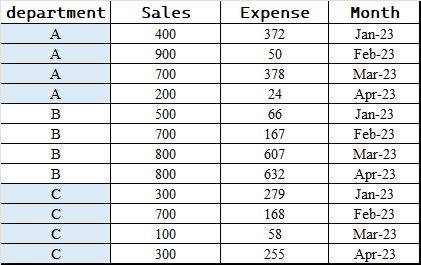
Let's take a simple table of sales data. How will I get -
- Example#1 - Monthly cumulative sales, expense of the Org
We can join the table with self on two condition i.e. department = department and Month >= Month
Basically, it will add the rows needed e.g. for Jan, no rows and for March, two rows i.e. Feb and Jan. This is what we need for a cumulative sum
SELECT t1.Month, SUM(t2.Sales) AS Cumulative_Sales, SUM(t2.Expense) AS Cumulative_Expense
FROM   learn.sales_expense t1
INNER JOIN learn.sales_expense t2 ON t1.department = t2.department and t1.Month >= t2.Month
GROUP BY t1.Month
ORDER BY t1.Month;
- Example#2 - Monthly cumulative sales, expense of each department
I leave this as an exercise.
What Windows functions facilitate
The SQL in its current form lacks elegance and look more of a work-around. This is where Window Functions come into their own, offering a powerful toolset for elegant and expressive SQL capability.
What it gives and How it works
For each row, we can define a window—essentially a set of rows related to it—over which the Window Functions can operate, with these tool
Window Range
Window Ordering
Window Partition
Let's learn each one by one.
Window Range
Using Range, we create a visible window of range to work up-on e.g. in the sample query we needed a range from start of the data to the current row
Following images demonstrate different cases(Not exhaustive).
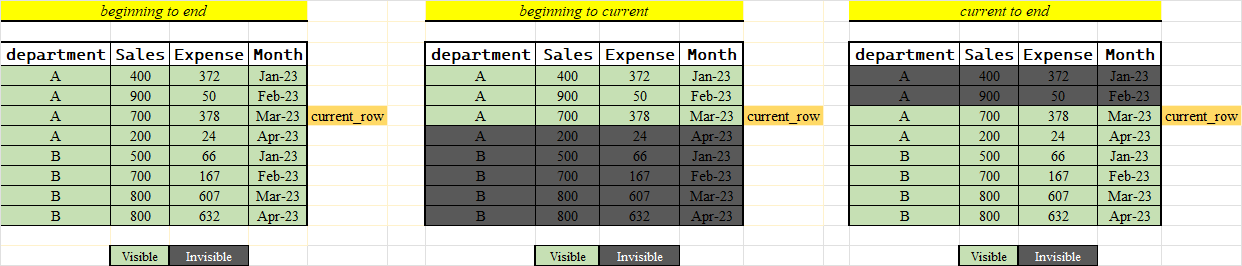
Images are self-explanatory, for our case we need the 2nd scenario
How to do it with SQL
High level syntax - agg_function or window_function OVER ()
So, the power comes from over(). When we say over(), it gives us the window for each row,
SUM(Sales) OVER () AS Cumulative_Sales
Why the above query will work
The important question is, how the range is decided out of the 3 scenarios we discussed and many other possible scenarios.
This is achieved by the optional frame_clause that can be one of [Check pgsql docs]
UNBOUNDED PRECEDING
offset PRECEDING
CURRENT ROW
offset FOLLOWING
UNBOUNDED FOLLOWING
So, when we left it blank, it fall back to the default value. In PostgreSQL, when using window functions, if the frame_clause is not specified, the default is RANGE BETWEEN UNBOUNDED PRECEDING AND CURRENT ROW for the OVER() clause.
Window Ordering
This must be obvious by now to define some sense of order before blocking the windows range otherwise we may not achieve the desire result e.g. in our example, the ordering on month is must before we define window.
How to do it with SQL
High level syntax - agg_function or window_function OVER ( order by column_name)
SUM(Sales) OVER (order by month) AS Cumulative_Sales
Window Partition
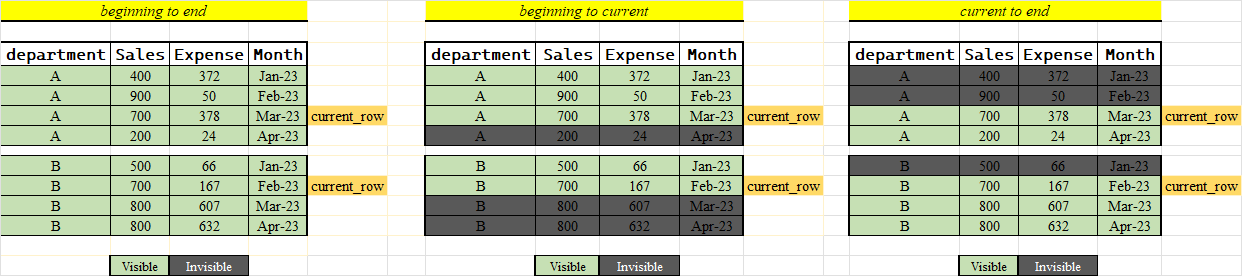
Partitioning is key when we’re working with window functions. It splits the data into clear sections or groups, allowing us to apply RANGE and ORDER within those boundaries. It’s like when you're organizing a big event and you have different activities in separate areas.
For our data, without partitioning, the RANGE would extend across the entire set. The image below clearly shows how partitioning organizes the data, making it easier to focus and calculate values for each department on its own.
How to do it with SQL
High level syntax - agg_function or window_function OVER ( partition by column_name_1 order by column_name_2)
SUM(Sales) OVER (partition by department order by month) AS Cumulative_Sales
Analytics functions and multiple over() clause
In addition to the core window function tools we've discussed, SQL provides a variety of auxiliary features to streamline our database work
Analytics function - This is like we have a superpower to do more than just group data with aggregate functions e.g.
SUM, AVG. There are some special functions made just for this that help us identify and organize our data in really useful ways. Here's a quick rundown of some of them in this category:row_number(): Assigns a unique number to each row.rank(): Numbers rows with tied ranks skipping subsequent numbers.dense_rank(): Numbers rows sequentially, no skips for ties.
Below is an image depiction for better understanding.
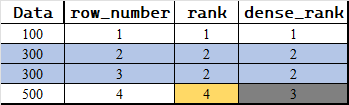
Check the official doc for an exhaustive list esp. lead, lag [ Windows function ]
Multiple over clauses - We can have multiple over clauses. Few rule to keep in mind [ Official doc ]
7.2.5. Window Function Processing
When multiple window functions are used, all the window functions having syntactically equivalent
PARTITION BYandORDER BYclauses in their window definitions are guaranteed to be evaluated in a single pass over the data. Therefore they will see the same sort ordering, even if theORDER BYdoes not uniquely determine an ordering. However, no guarantees are made about the evaluation of functions having differentPARTITION BYorORDER BYspecifications. (In such cases a sort step is typically required between the passes of window function evaluations, and the sort is not guaranteed to preserve ordering of rows that itsORDER BYsees as equivalent.)
Practical examples
Let’s delve into a few practical examples that incorporate the various aspects of window functions such as PARTITION BY, ordering with ORDER BY, the frame specification with RANGE, and the use of specific ranking functions like ROW_NUMBER(), RANK(), and DENSE_RANK(). These examples will provide a clearer understanding of how these features can be combined to address complex data questions.
Let's look at the 2nd problem that we left as an exercise. Its exactly the first problem and partitioning on department
 SELECT
   department,
   Month,
   SUM(Sales) OVER (PARTITION BY department ORDER BY Month) AS Cumulative_Sales,
   SUM(Expense) OVER (PARTITION BY department ORDER BY Month) AS Cumulative_Expense
 FROM sales_expense
 ORDER BY department, Month;
Sequential Month-over-Month Growth Rate by Department
How to think
By department =>
Partition by departmentsequential =>
order by monthGrowth rate => its
(current_sales - last_sales)*100/last sales. Now, to get last sales, we can useLAG()windows function.SELECT department, month, sales, (sales - LAG(sales,1) OVER (PARTITION BY department ORDER BY month) )*100/(LAG(sales,1) OVER (PARTITION BY department ORDER BY month)) AS growth_rate FROM learn.sales_expense;Year-to-Date (YTD) Sales and Expense Ratio by Department
How to think
By department =>
partition by departmentsequential =>
order by monthRange => Default will work since YTD will need
UNBOUNDED PRECEDING AND CURRENT ROWYTD =>
SUMtill current row. Do for both sales and expenseSELECT department, month, (SUM(sales) OVER (PARTITION BY department ORDER BY month) /SUM(expense) OVER (PARTITION BY department ORDER BY month)) AS ytd_sales_expense_ratio FROM learn.sales_expense;We may use
nullifto safeguard againstdivide-by-zero.Rolling Three-Month Average Sales Across All Departments
Its simple just use the right
RANGE, no partitioning as its across departmentSELECT department, sales, month, AVG(sales) OVER (ORDER BY month ROWS BETWEEN 2 PRECEDING AND CURRENT ROW) AS rolling_3_month_avg_sales FROM learn.sales_expense;
- Identify the 2nd best sales month for each department
How to think
By department =>
partitionby departmentsequential =>
order by monthRange => Default will work since we need ranking
RANK => We can use
dense_rankhere. Why ?SELECT department, month, sales FROM ( SELECT department, month, sales, DENSE_RANK() OVER (PARTITION BY department ORDER BY sales DESC) as rank FROM learn.sales_expense ) as ranked_data WHERE rank = 2;If asked for 2nd worst case, just change the order by to ASC.
Miscellaneous and left-over
Window Function Processing
If the query contains any window functions, these functions are evaluated after any grouping, aggregation, and HAVING filtering is performed. That is, if the query uses any aggregates, GROUP BY, or HAVING, then the rows seen by the window functions are the group rows instead of the original table rows from FROM/WHERE.
Rank vs Dense Rank
This is commonly asked question. Technically, its easy to answer that rank simply follow the row_number after tied values while dense_rank continues on next rank Though the questions remains, what is the practical use case. So, here is one way to think of it,
Whether the questions is what is the company's 2nd best sales month/figure Or Which is the top 2 performing sales person ?
Assume the tie is at 1st place, for the former, rank is useful i.e. the 3rd value is required while for the later dense_rank would be useful i.e. the tied names are sufficient.


